PGTuner - your all in one PostgreSQL monitoring
companion with precision.
Delivering comprehensive, real-time diagnostics and prescriptive
recommendations to optimize PostgreSQL stability,
and exceptional performance.
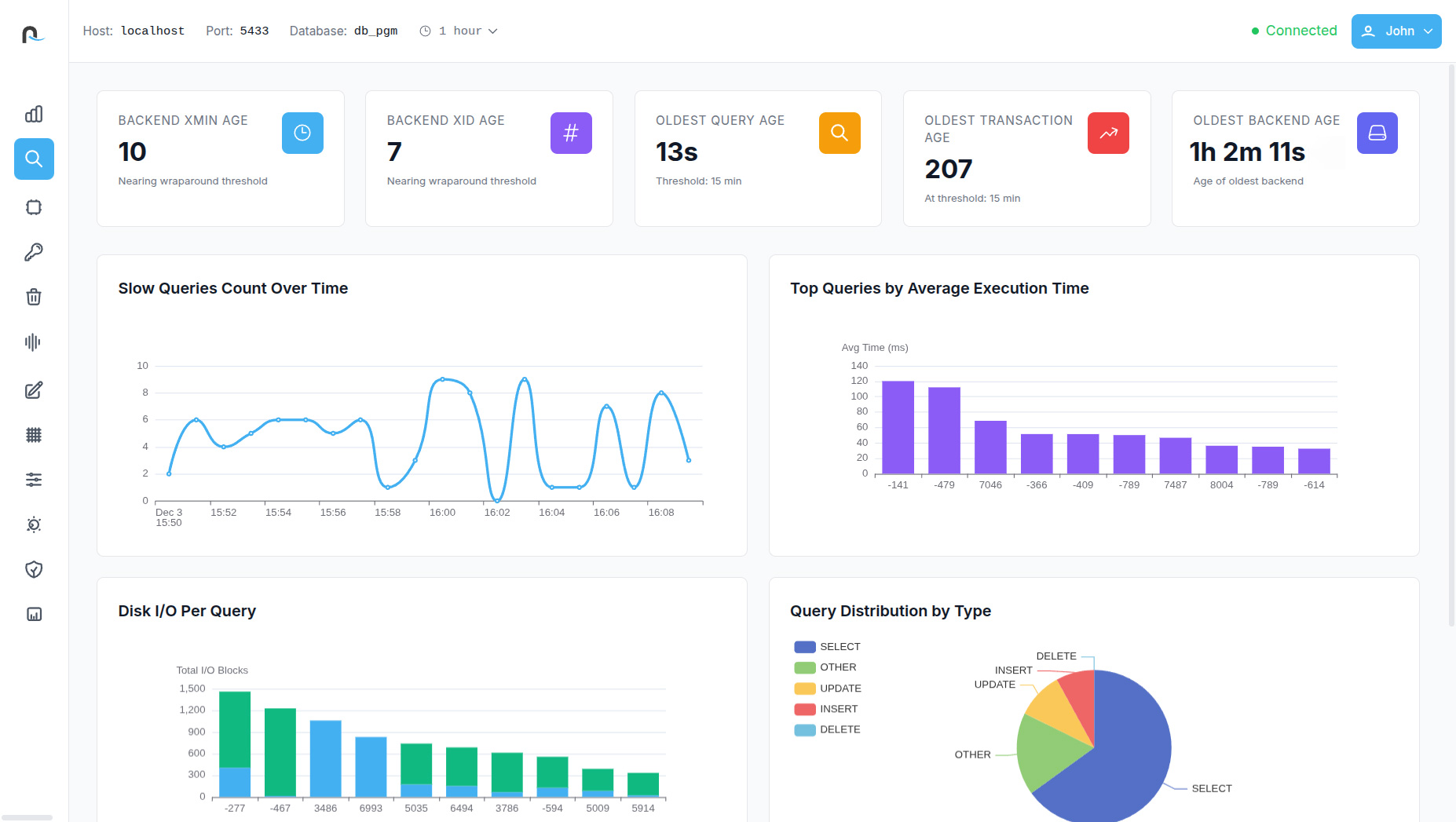
Optimize your PostgreSQL databases with precision and transform slow queries into high performance results using next-generation automation and AI.

PGTuner provides a comprehensive snapshot of your database’s overall health, giving teams instant visibility into active connections, database size and its growth rate, table count, server uptime, cache hit ratio, and dead tuple percentage. It also includes rich visualizations—such as active connections over time, CPU utilization trends, cache hit ratio trajectories, and transaction statistics per table. This consolidated view helps identify early warning signs, monitor workload patterns, and maintain a consistently healthy PostgreSQL environment.

The tool offers a deep dive into critical performance indicators like backend xmin/xid age, the oldest active query, transaction, and backend age. It visually highlights slow queries, top queries by average execution time, disk I/O per query, and query distribution by type. PGTuner also provides a detailed breakdown of slow queries, enabling users to quickly identify inefficient workloads, pinpoint the exact query causing delays, and prioritize optimization efforts with clarity.

With a single click, complex execution plans are transformed into an intuitive visual tree. Every execution node—Sequential Scans, Index Scans, Nested Loops, Hash Joins, Join Filters, and more—is clearly represented with associated tables, filters, and conditions. This readable visual flow helps developers quickly spot performance bottlenecks such as slow scans, expensive loops, or poorly optimized joins, making plan interpretation significantly easier and more actionable.

PGTuner allows users to compare two query plans in a structured, visual format to understand how changes in indexing, filters, or query structure impact performance. The comparison highlights differences in planning time, execution time, total cost, loops, and rows processed. A visual diff of plan nodes makes improvements—or regressions—instantly visible. This gives teams the confidence to validate optimizations before deploying them into production.

Reveals real-time query waits, helping teams identify blocked or waiting operations instantly. It also highlights the top queries by total I/O usage, provides detailed resource consumption over time, and offers refined views of current query activity. Users can explore PostgreSQL’s query wait distribution and I/O usage breakdowns to better understand which workloads are consuming the most disk, CPU, and memory resources.
The Index Analysis dashboard provides visibility into total index count, index size, unused indexes, and their storage impact. It includes usage graphs, index type distribution, and a comparison of sequential scan versus index scan ratios. PGTuner also offers automatic index recommendations, highlights unused or redundant indexes, and displays full index definitions—helping users improve performance and reduce unnecessary storage consumption.

This section focuses on table health and storage efficiency by showing dead tuple trends per table, vacuum activity over time, total disk writes caused by vacuum operations, and the latest autovacuum timestamps. It also reports total dead tuple counts and lists current vacuum-related configuration parameters along with their active values. These insights make it easier to fine-tune autovacuum settings and maintain optimal table performance.

Table Analysis provides a clean, high-level snapshot of your table’s overall health and performance. It highlights essential metrics such as index scan ratio, write activity, dead tuple percentage, hot update efficiency, and fill factor, giving you an instant understanding of how well the table is optimized. Visual charts break down scan types and row operations, while quick-access stats reveal table size, index size, and bloat levels.
Because PGTuner transforms complex database monitoring into a single, simple, feature-rich dashboard anyone can use.
View More
Premium
$99 /month
Absolutely. PGTuner provides:
You can quickly find the exact query slowing down your system—and understand why.
No. PGTuner reads from standard PostgreSQL system catalog views and statistics extensions. It is non-intrusive, requires no code changes, and is safe for production environments.
PGTuner’s Index Analysis dashboard shows:
This helps reduce storage bloat and improve query performance.
Yes. The Transactions & Locks Analysis module shows:
You can instantly identify what is causing contention and take corrective action.
Yes. PGTuner provides detailed views of:
This helps you maintain healthy and efficient storage over time.
